How it works
How Agent Office works
One dedicated machine runs everything: the AI employees and their board, the 3D office, the admin console, and the one gateway model calls go through. This page walks through each part and says what is finished and what is not.
Part 1
The machine
Agent Office installs on one machine that does nothing else: Ubuntu 24.04 LTS on x86_64, either a physical box or a virtual machine in your own data centre or cloud account. Hardware lists reference boxes and what each can run.
On that machine it runs as three separate system users and one small root helper. Nothing in the product itself runs through sudo.
| User | Runs | Holds |
|---|---|---|
| The control plane | The office, the admin console, and the worker that runs scheduled jobs | The databases, the vault key, the audit log, the kill switch, the company pack, the outbox |
| The runtime user | The agent runtime and every AI employee | The employees' profiles, their workspace and the Kanban board |
| The gateway user | The inference gateway, and nothing else | The model-provider credentials, sealed to the gateway's own key |
| root | A root helper with nine fixed commands, and the kernel firewall tables | The instance file (the only source of roles), the key store, the audit anchor log |
The office and the admin console are two separate web origins, with separate sessions. The office shows the most AI-written text, so a bug there is kept away from approvals, credentials and configuration.
People reach them over an SSH tunnel, or over your own Tailscale network; the machine needs no public port. The SSH-tunnel mode is the verified path; the Tailscale mode has not yet been run end to end.
Why a machine of its own
AI employees can hold real tools on the machine. Until each employee is sandboxed, anything one employee can reach, every employee can reach. So nothing else of value should share the machine, and the installer asks you to confirm that before it continues.
Part 2
Employees and the board
Each AI employee has a name and title, a department, a model class, a persona (one voice and up to three lenses), a set of tools, and the channels they may submit messages to. Employees keep skills and memories, and you hire, pause, archive and rehire them from the admin console.
Models are chosen by class, not by name. A class is a requirement your company pack defines; the starter packs use lead, worker, reviewer, fast and vision. Swapping a model is one company decision, not ten profile edits.
The Kanban loop
- Work arrives as a card on the board.
- The chief, the employee who routes work, breaks it down, assigns it and unblocks it.
- The assignee works the card with their tools, then asks a peer for review.
- The starter packs include a critic: a devil's-advocate role that challenges plans, numbers and claims before they ship.
A pack can ask for the reviewer class to use a different model family from the worker class. When they share a family you get a warning, and automatically sent items escalate to you.
Tools
The starter packs grant no terminal, no code execution and no browser. Granting a terminal or code execution is an owner action that needs the PIN, and the browser tool cannot be granted in this release.
Company packs
Everything company-specific is a pack: the company (name, goals, milestones, brand, hours, budgets, model classes, rituals), the roster, the channels, the office layout, the handbook, personas, skills and compliance rules. Packs are versioned with git on the machine and changed through plan, diff, lint, apply and roll back. Five starter packs ship: startup, agency, ecommerce, research-lab and blank.
Part 3
The office
The office is a 3D floor generated from your company pack: departments, desks, the company board, and a sky and clock that follow company time. It runs in any browser with WebGL 2, with no plugin, served from your own machine.
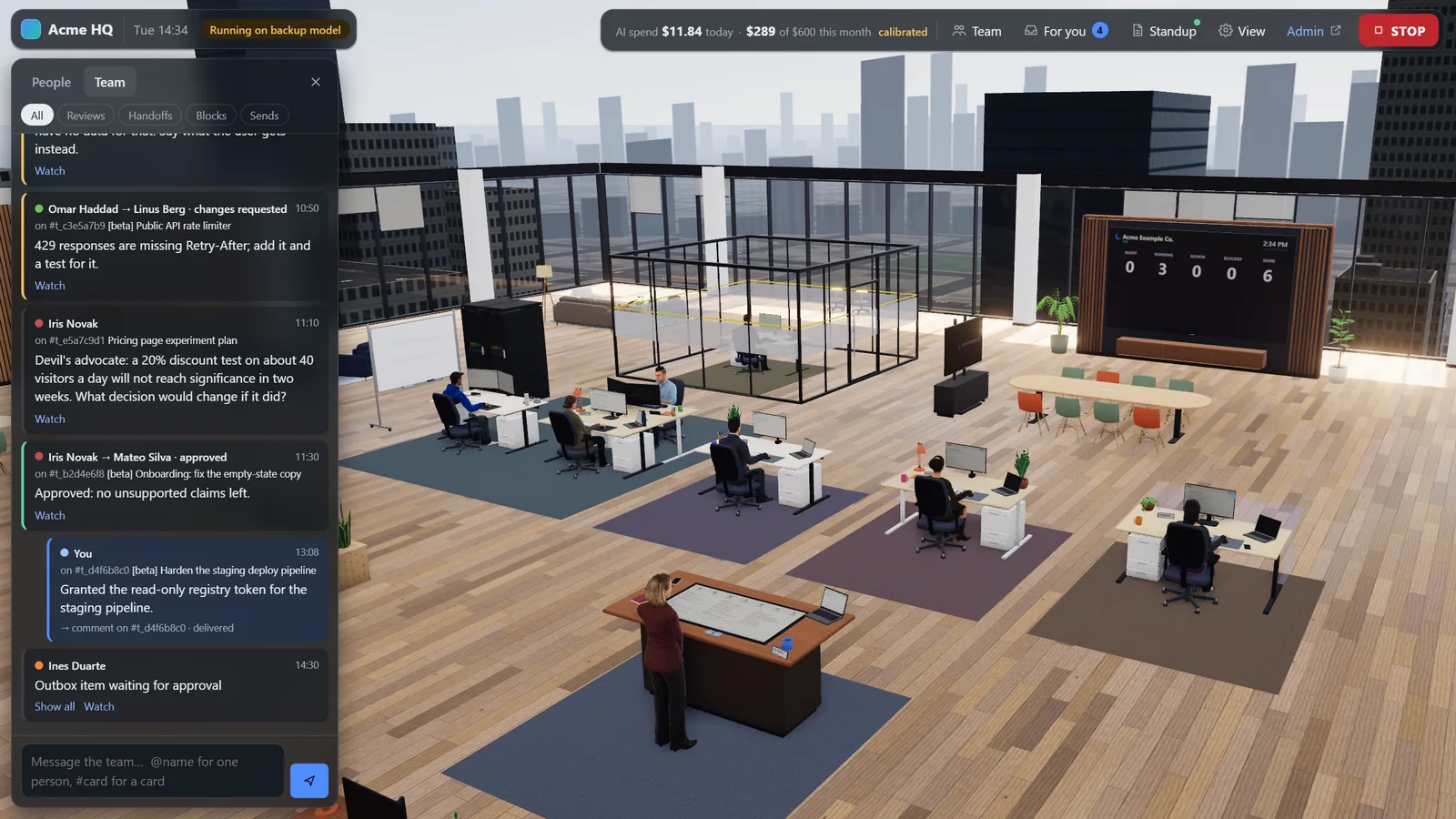
It is driven by one event stream from the machine, so what you see on a screen or in a speech bubble is what actually happened on the board. The office spends no model tokens: every scene is chosen by rules in your browser.
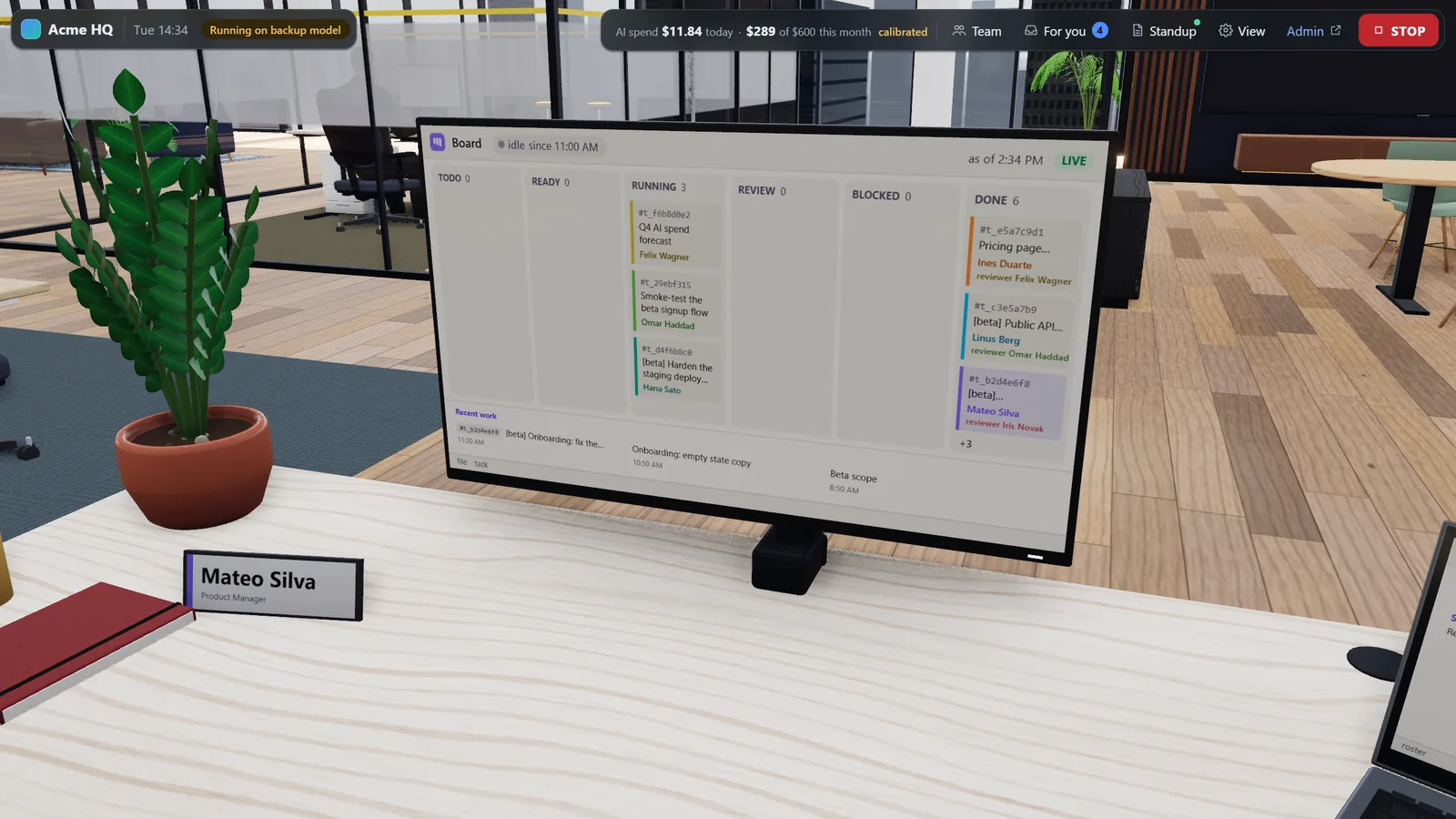
- Surfaces show real work. Every screen, sticky note, printout and whiteboard is bound to a record from the board, the files or the outbox, and every quoted string names the record it came from.
- Private text stays off the walls. Text is redacted and length-capped before it reaches a surface, so a desk can show a card title without showing inbound personal data.
- Nobody pretends to be busy. A person types only while real typing activity is reported for their card; otherwise they read or think.
- One page, one STOP button. A Team channel, a heads-up display with spend and board counts, a drawer for any person, card or file, and a STOP button are part of the same page.
Being finished The office and its people
The 3D office and its people are built, and their critic review rounds are still running. A first visit is slow while the browser prepares the office's graphics, and the people's animation budget is not met yet. The realistic default cast is an optional download that is not published yet, so a new machine shows procedurally generated people. The office pictures on this site show that cast.
Part 4
The inference gateway
One process on the machine, the inference gateway, runs as its own user. It is the only process that holds a provider credential, and the path every model call is meant to take. Employees reach it on a local port, each with their own token; the platform's own components reach it on a local socket.
- Providers. Ten kinds ship: a model server on the machine, your network or your tailnet (Ollama, vLLM, SGLang, llama.cpp, LM Studio and others), OpenRouter, OpenAI, Anthropic, Azure OpenAI and AI Foundry, Amazon Bedrock, Google Vertex AI, the Google Gemini API, DigitalOcean, and any other OpenAI-compatible HTTPS endpoint.
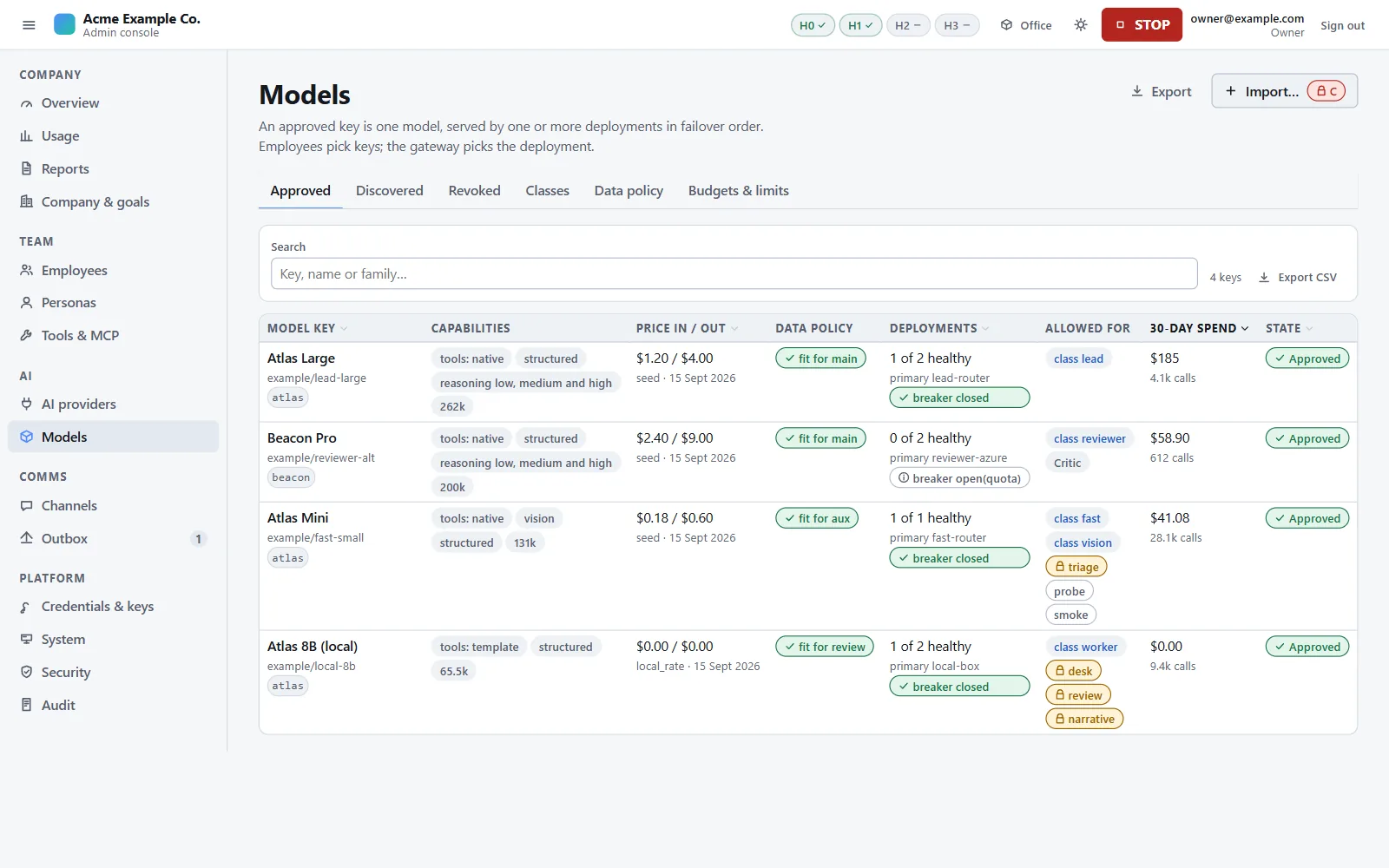
- Approved models. The console shows what each provider offers and what your company may use. An approved model can have several deployments across providers, in failover order.
- The data policy on every call. Zero-retention or local only, region, precision floors and provider exclusions are compiled into a closed set of allowed deployments. No request field, header or failover can widen it.
- Provenance. Each deployment's data attributes are derived, never typed, and say where they came from: verified (the machine proved it), attested (the owner stated it, and the statement is recorded) or unknown, which never satisfies a rule.
- Failover happens only before the first byte, only between deployments that satisfy the same policy, with a circuit breaker per deployment and per host.
- Budgets. Day and month windows in the company's time zone, for the company, each model class, each employee and each token. Money is reserved before a call and settled after it; a ceiling is a hard stop.
- Metering. One record per call (tokens, cost, deployment, timings), never the content.
- Refusals are final. A provider's content-filter refusal is not retried and not failed over to another provider.
- It fails closed. If the gateway is down, AI work pauses. There is no fallback to a provider key.
Local models. A model server you run is registered as a local provider, and the same policy, budgets, metering and kill switch apply to it. Agent Office never ships, bundles or downloads model weights: you install the model server and download the weights yourself, under each model's own licence.
Known gap One route around the gateway is still open
The agent runtime lets a Kanban card name the model service its worker runs on, and some services need no key. A worker could therefore run a session outside your data policy and budgets. Today a health check blocks such cards within about a minute, the nightly cross-check flags the unmetered use, and the kill switch's top level stops it: all after the fact. The fix, refusing such a card when it is created, is on the release checklist. All known gaps.
Part 5
The outbox
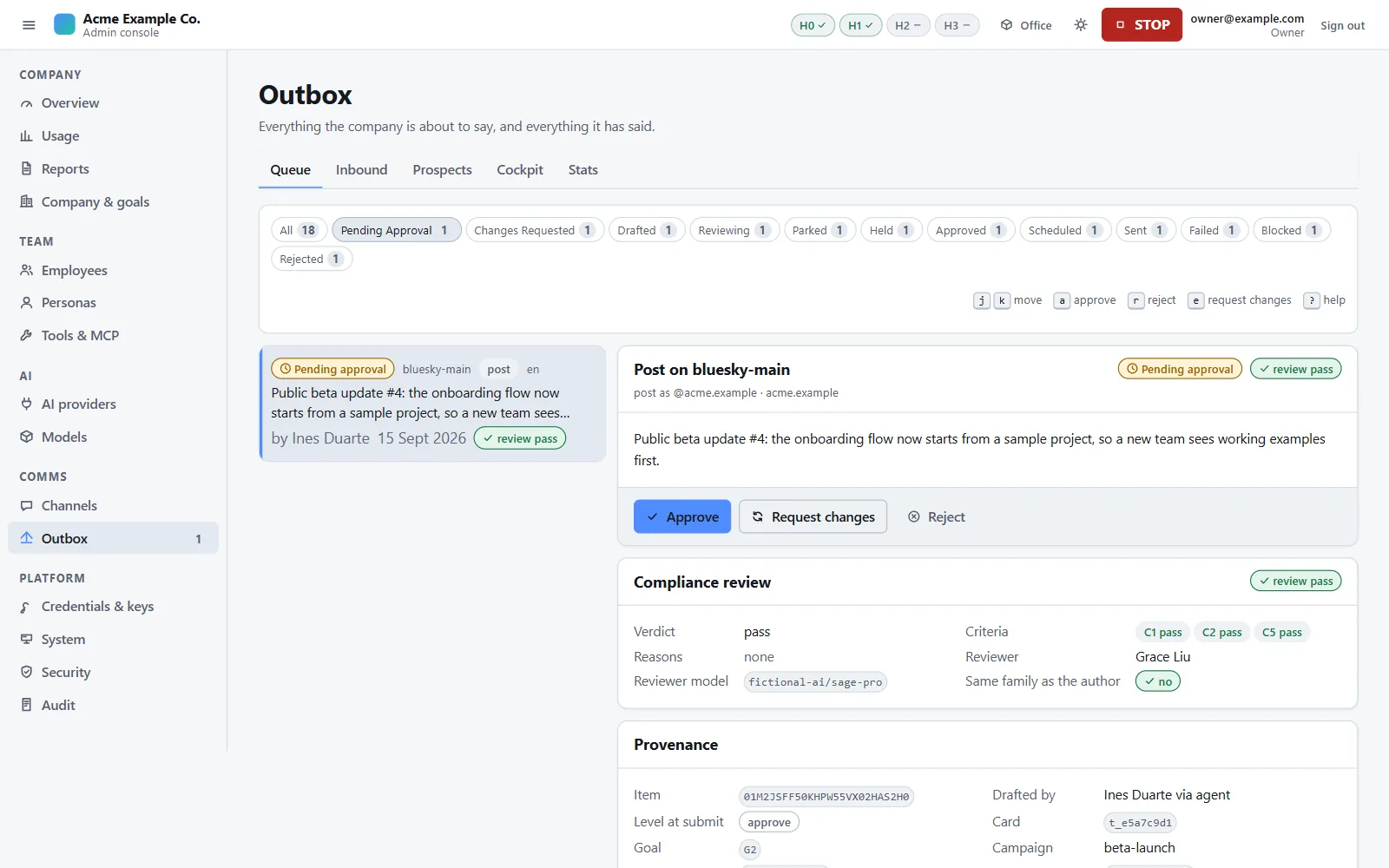
No message an AI employee writes reaches anyone outside your firm except through the outbox. The employee submits a draft with one tool; the outbox, not the employee, decides where it goes: a reply goes to whoever wrote in, a post goes to a target configured on the channel.
Each channel and message class has an autonomy level:
| Level | What happens |
|---|---|
disabled | The class cannot be submitted. Cold outreach starts here. |
draft | The item is written and parked for a person. |
approve | The item waits for a person's approval. Every class starts here. |
auto | The item sends itself, but only after every gate passes. |
- You approve exact content. Approving records a hash of the text, subject, rendered page, media and destination shown on screen. The sender recomputes it just before sending and refuses anything that changed. An approval without a schedule expires after 72 hours.
- Two-stage review. First a fixed lint: banned terms, unregistered claims, links outside an allowlist, secrets and internal paths, a missing postal address on email, and anything echoed from the message being answered. Then a model review with no tools against your claims registry. A review that is skipped or fails is never a pass.
- Automatic sending needs every gate green: the identity guard, separate control and runtime users, the stricter egress rule on, a kill-switch drill in the last 30 days, a passing channel test, a compliance profile and a reviewer. Items employees draft cannot be automatic while any active employee holds a terminal, code execution or a browser.
- Anything inbound text has touched is tainted and can never be automatic.
- Frozen ceilings no company setting can raise: at most 3 automated replies to one person in 24 hours, 60 automated sends an hour and 400 a day, and never a reply to one of the firm's own accounts.
- Cold outreach always needs the owner's PIN and a terms-of-service acknowledgement, and no channel in this release can send it automatically.
- Automated replies say so. An automatic reply without the configured AI-disclosure line is blocked by default.
- Opt-outs win. An unsubscribe, stop word, bounce or block lands on the suppression list at every kill-switch level.
A new install sends nothing. A company pack starts with no channels, a channel sends only once its credentials are set and its submitters are named, and every class starts at approve.
The model that reads inbound mail cannot act. Replies that may be automated are drafted by a reply desk with no tools, from knowledge the company pack provides. Inbound text is fenced so a message cannot close its own block, and an employee who reads it is tainted for six hours: their outbox items are held at approve, the gateway applies the stricter data-policy floor, and their outward-reaching built-in tools are blocked (shown by tests; not yet run on a machine with a real model).
Part 6
Governance
Signing in
Every human login needs two factors: a passphrase (or a tailnet identity), then a code from an authenticator app. A used code cannot be replayed, five wrong codes lock that login's second factor for 15 minutes, and only root on the machine can reset a lost one. Roles come only from a root-owned file on the machine; nothing in the console can grant one.
Guard tiers and the PIN
Every action declares a guard tier, and the tiers add up:
| Tier | Needs |
|---|---|
| V | Any signed-in role |
| M | A member, the identity guard, this origin's CSRF token and a JSON body |
| W | An admin, plus everything M needs |
| D | W, plus a confirmation of this exact request: a three-word phrase the person retypes |
| C | The owner, D, plus the owner's PIN for this one action |
A PIN entered for one action cannot be reused for another: there is no elevation window. The PIN is set on the machine, never through a browser form. Tiers follow what a change does, not which route carried it: granting a credential, adding a tool server, raising an autonomy level or loosening the data policy are all owner actions with the PIN.
The audit log
Every state change, owner decision, credential use and send is appended to one log. Before a row is hashed, secret-shaped values are replaced, and email addresses and phone numbers are replaced by hashes. Each row's hash covers the previous row's, so editing or deleting a row breaks every hash after it. Every hour the chain's head is written to a root-owned file, and a health check re-verifies the chain every 15 minutes. In this release no command compares the chain with that file; it is compared by hand (known gaps). The log is never pruned, and the owner can export it.
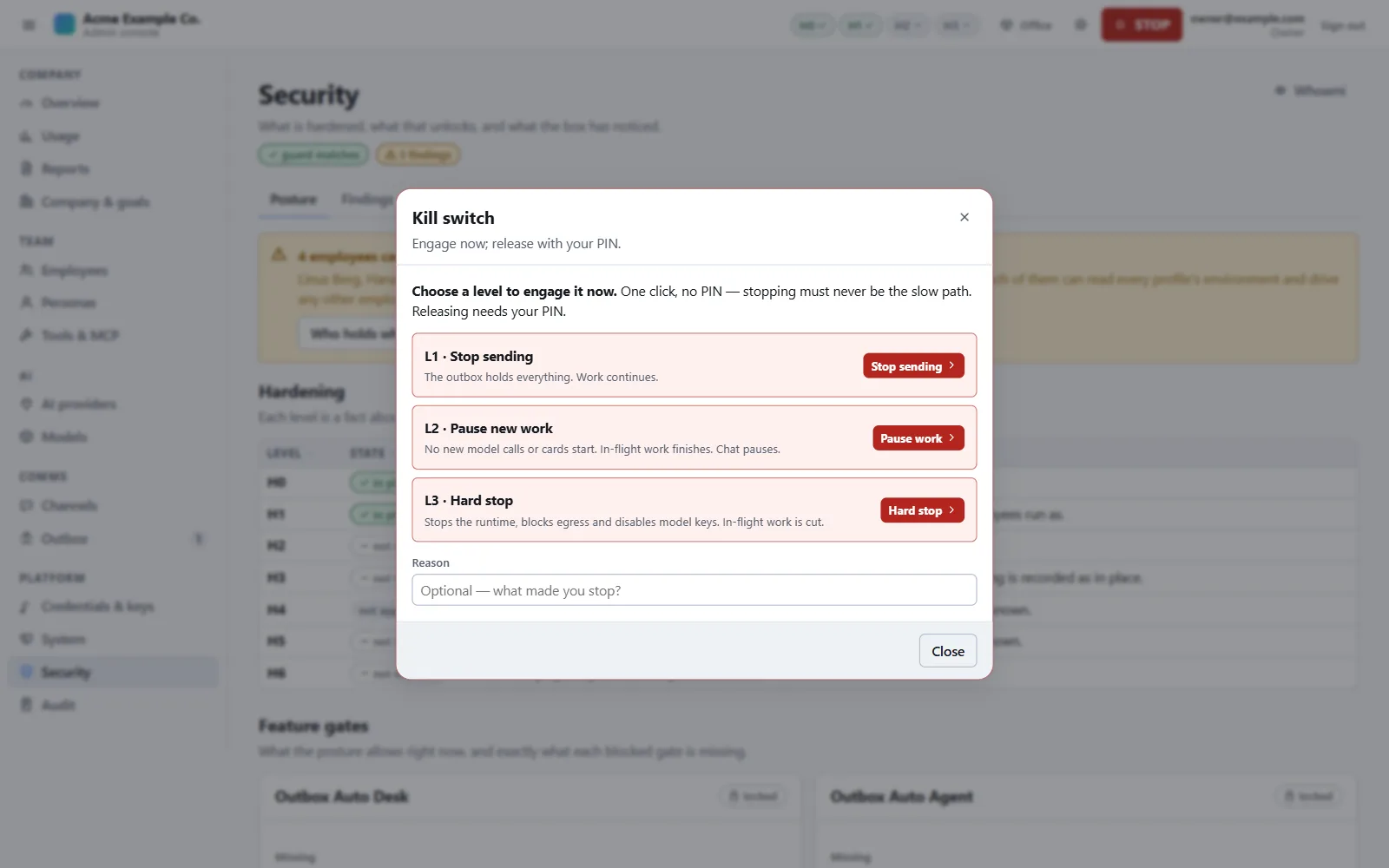
The kill switch
| Level | Effect |
|---|---|
| L1 | Sending stops. Everything is held as a draft. Opt-outs are still honoured. |
| L2 | New work pauses too. Sessions already running drain under a cap. |
| L3 | Hard stop. Every worker halts, a kernel rule drops all traffic except the machine's own for the employees and the gateway, and every model call is refused. |
Any signed-in member engages it in one step, with no confirmation. Releasing it needs the owner and the PIN. The level survives a restart.
Secrets
Credentials live in a vault encrypted with AES-256-GCM, whose key only root can read. Each value is bound to its destination when it is set, and values are write-only: the console shows names and status, never the value. Model-provider keys are sealed to the gateway and never reach an employee, and a credential that can send is never written into an employee's environment.
Part 7
The admin console
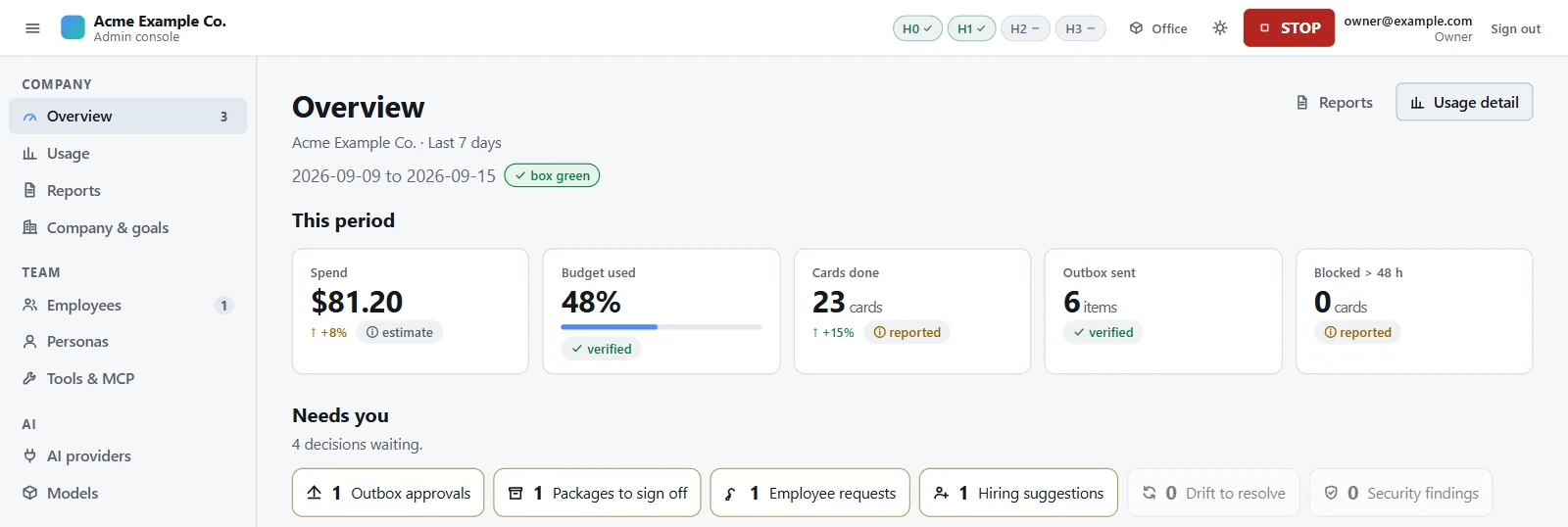
The admin and executive console has fifteen pages in five groups: Company (overview, usage, reports, company and goals), Team (employees, personas, tools), AI (providers, models), Comms (channels, outbox) and Platform (credentials and keys, system, security, audit). STOP is on every page.
Every figure carries its provenance where the server gives it: measured by the platform, reported by the runtime, or an estimate. The console also holds the executive report and hiring suggestions.
Not in the console yet A few tasks exist only as commands or API calls in this release, among them adding a channel and running the kill-switch drill that automatic sending requires.
Part 8
Installing and onboarding
Install. With a licence and your copy of the release, one command on the machine installs everything: sudo ./install.sh --auth local. The installer checks the hardware, chooses a tier for it, and ends with a setup address and a one-time setup token. In the recorded reference install, run in a verification virtual machine, a clean install took 76 seconds with no manual step. ao doctor then checks the install.
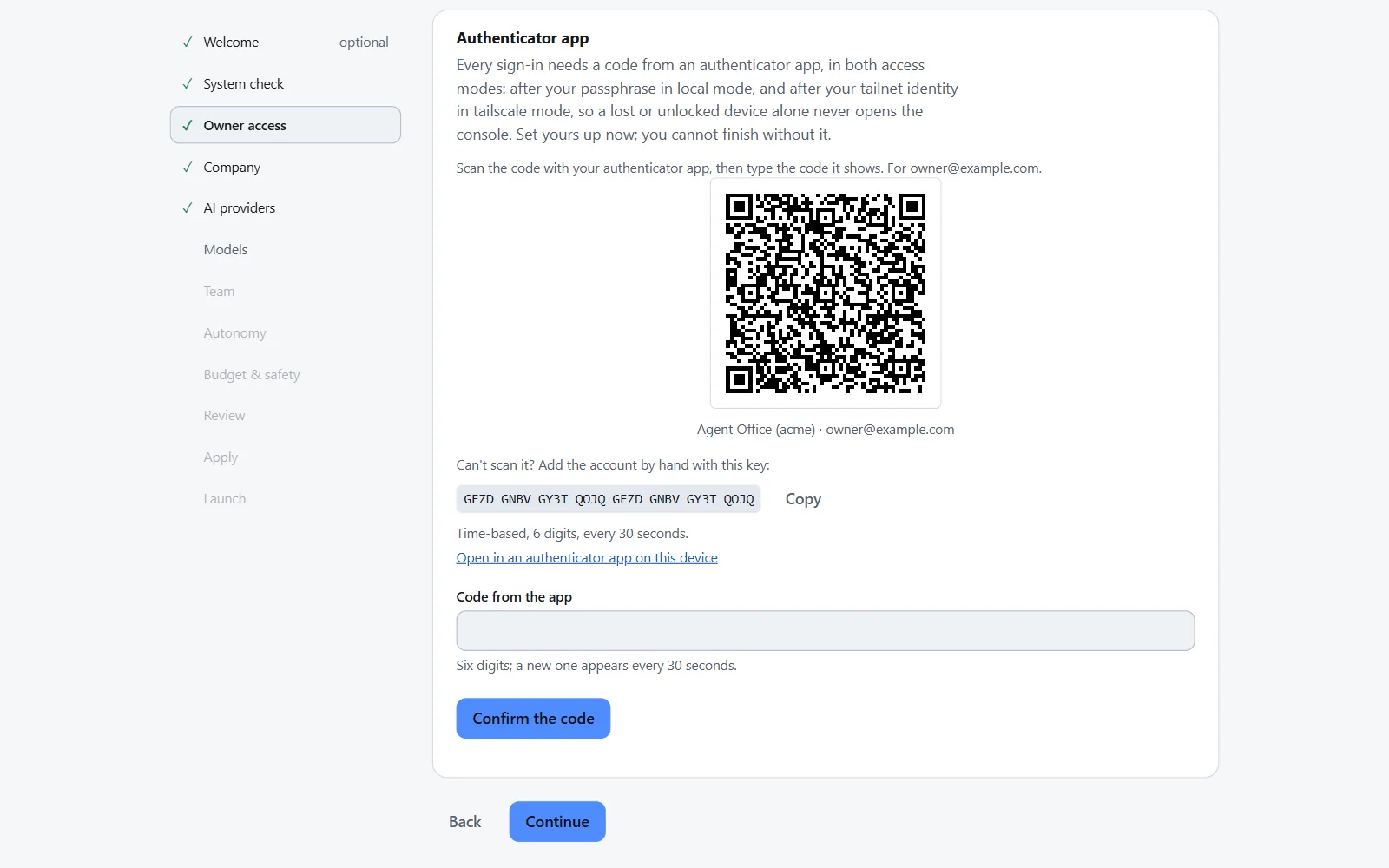
Onboard. A wizard in the browser walks through: system check, owner access, company and starter pack, AI providers, models, team, autonomy, budget and safety, review, apply and launch.
- The owner sets up an authenticator app; onboarding cannot finish without it.
- The wizard stops at the AI-provider step until at least one provider passes its test.
- Nothing spends during the wizard. Every channel starts at
approve, cold outreach startsdisabled, and onboarding ends with the kill switch engaged: you release it when you are ready.
Uninstall. The uninstaller archives everything the instance owns and deletes nothing.
Part 9
Where it stands
Version 0.1.0 is in pre-release; there is no tagged release yet. Built and verified below means implemented against frozen contracts, put through a separate critic review with its findings fixed, integrated, and passing the check suite.
| Area | State |
|---|---|
| Control plane and security | Built and verified |
| Company packs and company admin | Built and verified |
| Inference gateway | Built and verified |
| Outbox, channels and the agent plane | Built and verified |
| Metrics, reports and hiring | Built and verified |
| Office server | Built and verified |
| Admin and executive console | Built and verified |
Installer, onboarding and ao doctor | Built and verified Clean install, re-run, upgrade and uninstall verified on Ubuntu 24.04 in a WSL2 distribution and in a KVM virtual machine. Onboarding verified up to the AI-provider step. The installer's later release-trust and restart changes are tested, not yet re-run in the virtual machine. No bare-metal install recorded yet. |
| 3D office and its people | Being finished Built; critic review rounds still running; load and animation budgets not met yet. |
| End-to-end verification | Being finished The end-to-end journeys are being completed. The path from the wizard's AI-provider step to a first approved message has not yet been run with a real provider. |
How it is built
Contract-first: every one of the 270 routes has a frozen contract and a response fixture checked against it, and a suite of 12 checks runs on Ubuntu 24.04. Each feature track went through separate critic review rounds, run apart from the build, with their findings fixed before integration; the 3D office's rounds are still running. This is our own process, not a third-party review. The installer has been run on clean Ubuntu 24.04 installs, in a WSL2 distribution and in a KVM virtual machine, and each of the 13 defects those runs found was fixed with a regression test.