Security
Security in plain words, with the gaps left in
A summary of the Agent Office security whitepaper, for the person at a small firm who decides whether it may run inside the business. The full paper names the files and tests behind each claim, so a reviewer with the release can check them.
Not a certification
Agent Office LLC holds no security certification or third-party attestation, and no independent penetration test has been done. Nothing here says that the product, or a firm that runs it, complies with any law, regulation or standard. Where the product helps with an obligation, we say what it does and what evidence the machine keeps.
At a glance
- Who hosts it?
- You do, on one dedicated machine running Ubuntu 24.04 LTS on x86_64. Agent Office LLC hosts no customer instances and runs no service the product depends on.
- Can we see your data or reach your machine?
- No. The product sends nothing to Agent Office LLC: no telemetry, no licence check, no activation, no update check and no remote-access channel. Anyone outside your firm gets access only if you grant it with your own tools.
- Where do model calls go?
- To the providers and model servers you register and approve, through one gateway that applies your data policy, your budgets and the kill switch. One route around the gateway is still open in this release (known gaps).
- Can an AI employee send a message by itself?
- Not by default. Every message class starts at approve, cold outreach starts disabled, and automatic sending needs conditions the machine has to prove.
- How do people sign in?
- Two factors for every human login, and a per-action PIN for owner actions.
- Is there an audit trail?
- One hash-chained log of every state change, owner decision, credential use and send, anchored every hour into a root-owned file.
- Can we stop everything?
- A three-level kill switch any signed-in member can engage in one step. Releasing it needs the owner and the PIN, and it survives restarts.
- Where are the secrets?
- In an AES-256-GCM vault whose key only root can read. Values are write-only and bound to their destination. Provider keys are sealed to the gateway and never reach an AI employee.
- What is the biggest gap?
- The AI employees share one operating-system user. Until each is sandboxed, an employee holding a terminal or code execution can act as any other, so several per-employee controls are advisory (below).
Where it runs, and what we can see
- Customer-hosted, on one dedicated machine. A physical machine, or a virtual machine that does nothing else. The AI employees run real tools there, and until each is sandboxed, what one can reach, all can. The installer asks you to confirm the machine is dedicated.
- Nothing reaches us. No component reads a licence key, checks a licence date, or contacts agentoffice.work or any other Agent Office LLC address. There is no crash reporting, no usage reporting and no update check. A licence is a contract, not a mechanism in the code.
- The one component called "telemetry" stays on the machine. It writes records of sessions, tool calls and model calls (which model and tool, token counts, timings, status) to files for the console's Usage page. It never records prompts, tool arguments or results, and it has no network code.
- Support works from what you choose to send. The product has no remote-access feature. If you want hands-on help, you grant access with your own tools and remove it afterwards.
- Run by an IT provider. An IT provider may install and run the instance, including on a machine it dedicates to you. Anyone with root on the machine can read everything on it, including the vault key, the databases and the audit chain: the product gives no protection from root. Changes made through the console or the
aocommand are audited; changes made directly to files as root are not. - You choose the models. Agent Office never ships model weights and never resells model access.
What leaves the machine, and when
| What | When | To |
|---|---|---|
| Model calls | When an employee or a platform component uses a model | The providers and model servers you registered, through the gateway, under the data policy. One exception is open (known gaps) |
| Provider catalogue and health checks | Every 6 hours for the catalogue; free checks every 5 minutes; paid checks only if you turn them on | The same registered providers. Model lists and prices only; no company data |
| The agent runtime's model-metadata lookup | When the runtime needs a model's metadata and has no fresh copy | A public model-metadata catalogue on the internet. No company data is sent, but the site sees the machine's public address. Not switchable off in this release |
| Outbound messages | When you approve an item, or an automatic item passes every gate | The channel accounts you configured |
| Inbound polling | When the inbound pollers are on | The same channel accounts |
| Credential tests | When you test or set a credential | The destination the credential is bound to |
| The installer's downloads | During an install or an upgrade | The operating system's package mirror, the Python package index and the code host for the agent runtime, each checked against hashes pinned in the release, or by the package manager's signatures. With the optional Tailscale flag, also Tailscale's download site and package repository, and its install script, which is not pinned |
| The avatar pack (optional) | Only when you run the avatar install | The address pinned in the release; the file is checked against its hash |
| Web search and page reading | When an employee uses the web or search tools | The search service you configured. With none configured, the free public tiers of search services the agent runtime ships with (known gaps) |
| Fetches by address | When an employee attaches a file from a web address, or uses a terminal it holds | The public address named |
| Tool servers you attach | When an employee uses one | Wherever that server reaches. Attaching one is an owner action with the PIN |
Inside the machine
- Three system users and a small root helper. The control plane, the employees' runtime and the inference gateway are separate users. The control plane never writes into the employees' world directly; it goes through two helpers that run from root-owned, read-only code.
- The root helper has nine fixed commands and answers only the control-plane user. Every call it takes is written to the system journal, which the control plane cannot rewrite.
- Sandboxed services. Six of the eight service units run with systemd's sandbox settings (no new privileges, a read-only system, private temporary files, hidden processes, no core dumps), each able to write only its own state. The two that do not are the one-shot unit that loads the firewall tables at boot, and the runtime service that runs the employees, which is the single trust domain described below.
- The agent runtime is pinned. It is installed read-only at a pinned commit, built from its own hash-locked lock file, and nothing can install into it at run time.
- Employees can reach two things of the platform: a narrow socket with no approval, policy or secret commands, and the gateway's local port. Kernel tables keep them off both web origins and off every registered model server.
Sign-in, guard tiers and the PIN
- Two browser origins. The office and the admin console are separate, with separate session cookies and CSRF tokens. Every admin route is served on the admin origin only, and a test fails the build otherwise.
- Two access modes. In local mode both origins listen on the machine's loopback address only, reached over an SSH tunnel or a reverse proxy you run; the first factor is a passphrase of at least 12 characters, and repeated failures lock the login. In tailscale mode the first factor is your tailnet login.
- A second factor for every human login, in both modes: a time-based code from an authenticator app. A used code cannot be replayed, five wrong codes lock the login's second factor for 15 minutes, and ten single-use recovery codes are kept only as salted hashes.
- Roles come only from a root-owned file on the machine. Nothing in the console can grant a role.
- Sessions last at most 12 hours and end after an hour idle by default. Cookies are
HttpOnly,SecureandSameSite=Strict. - Five guard tiers, ending in owner actions that need the PIN for that one request. A confirmation is single use, lasts five minutes, and is tied to the login, the origin and the exact request. The PIN is set on the machine; five wrong PINs lock the login for 15 minutes, and each is audited.
- Tiers follow what a change does. A change to what employees can do is computed as a capability difference, and the strongest change decides the tier, including for reverts, rollbacks and imports.
- Root on the machine counts as the owner. That is why the machine itself is the root of trust, and why it must be dedicated.
- Not provided: single sign-on, SCIM provisioning or directory integration.
The audit log and the kill switch
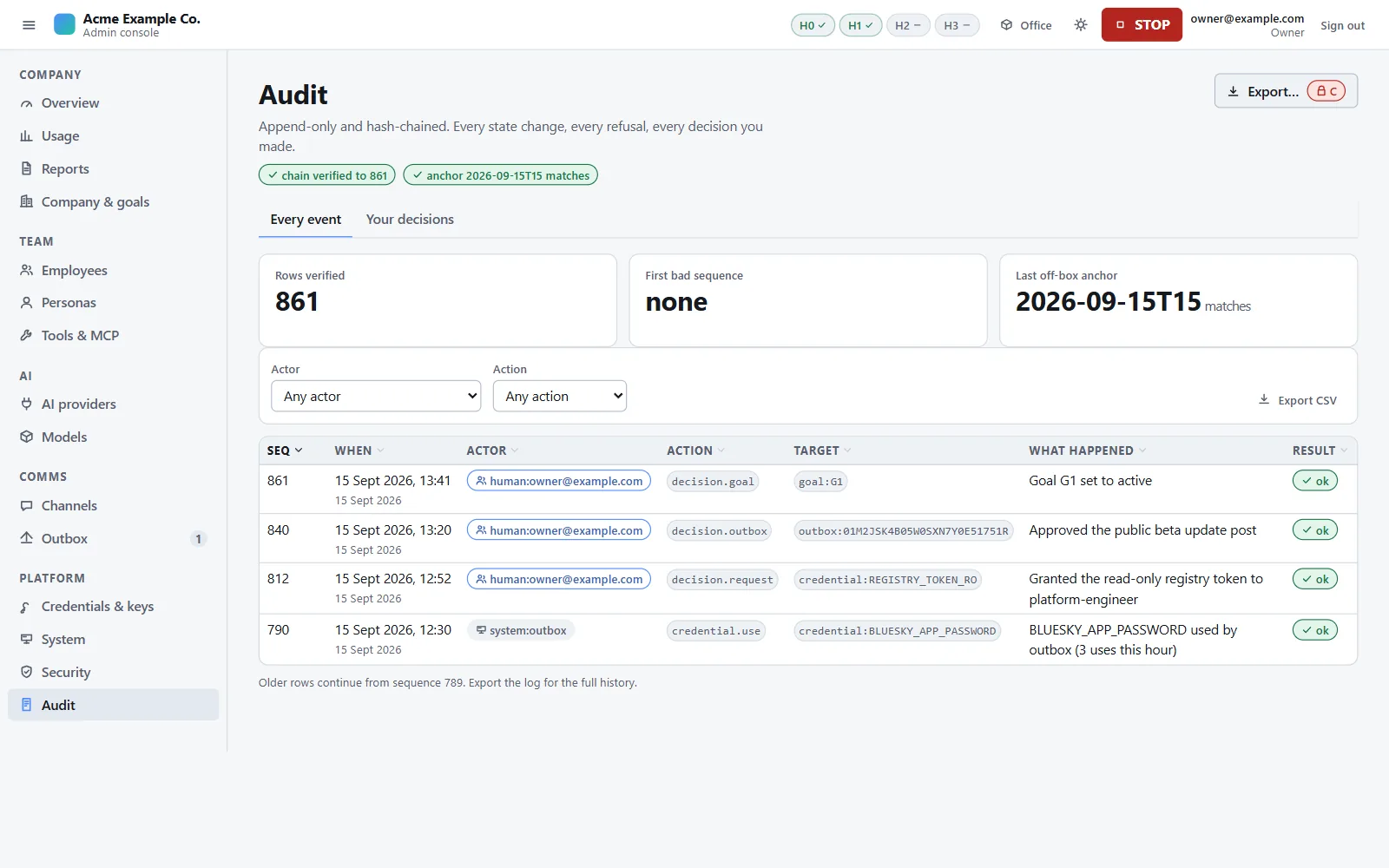
- What is recorded: every state change (by a person, an AI employee or the system), every owner decision, every credential use and every send. Refused requests are counted per minute.
- Redacted before hashing. Secret-shaped values are replaced, and email addresses and phone numbers are replaced by hashes. Inbound message text is never stored in the audit.
- Hash-chained and anchored. Each row's hash covers the previous row's. Every hour the chain's head is appended to a root-owned file the control plane can append to but not rewrite, and the most important events are mirrored to the system journal.
- Kept for ever, and checked. The console's Audit page and a command re-hash the chain; a health check does the same every 15 minutes. No command yet compares the chain with the root-owned anchor file: that comparison is by hand in this release (known gaps). The owner can export the log.
- Authority lives only in the audit. A card, a comment, a chat message or a file is never authority: owner decisions are audit rows.
- The kill switch. L1 stops sending, L2 pauses new work, L3 halts every worker, adds a kernel rule that drops outside traffic for the employees and the gateway, and refuses every model call. Engaging takes one request by any member, with no confirmation. Releasing needs the owner and the PIN. The level is recorded in four places and each reader takes the highest, so a restart cannot quietly release it.
- Automatic breakers stop a channel on repeated send errors or a high complaint rate, and demote it to approve on bursts of opt-outs.
Model calls
- One gateway. Model calls go through one process that runs as its own user. If it is down, AI work stops; there is no fallback to a provider key.
- What keeps calls on the gateway today: it is the only process that holds a provider credential; provider keys and routing settings are refused in an employee's environment; a kernel rule keeps the employees off every registered model server; three tools whose model call would go straight to a vendor are unavailable; attached tool servers cannot ask an employee's model for completions; and a nightly cross-check flags model use the gateway did not meter.
- Provider keys never reach an employee. They are sealed to the gateway's own key. An employee holds a gateway token that works only on the machine, and no field of a request can choose a provider, region or deployment.
- The data policy decides which deployments may receive which data: local only, zero data retention, or any. The starter packs admit only local and zero-retention deployments, with training set to never. Each attribute carries its provenance, and unknown never satisfies a rule.
- Stricter floors for sensitive work. In the starter packs, work that has read inbound text, and every model call the platform makes itself, require verified provenance. Loosening the policy is an owner action with the PIN; tightening it is not.
- Requests are cleaned. Client routing fields are stripped and only an allowlist of request fields is forwarded.
- Budgets are enforced before the call. Money is reserved at the deployment's price before a call and settled from the provider's own usage afterwards, so parallel calls cannot overshoot a cap. A small share of each window is kept back so replies to inbound messages still work late in the month.
- Metering is metadata only. One record per call; the writer refuses any record carrying prompts, completions or tool arguments.
The open route around the gateway is described under known gaps.
Messages and inbound text
- No message an employee writes reaches anyone outside the firm except through the outbox, which derives the destination from the channel and the message it answers, never from the employee. Other things can still carry data off the machine: web tools, a terminal an employee holds, the open route around the gateway, and attached tool servers (see the gaps below).
- Every class starts at approve, cold outreach at disabled. Raising a level is an owner action with the PIN.
- You approve exact content. The sender recomputes the approved hash just before sending and refuses anything that changed.
- A two-stage review, a fixed lint and then a tool-less model review, checks every draft. For an automatic send, the reviewer's model family must differ from the author's.
- Automatic sending needs every gate green, stays under ceilings no setting can raise, and is never allowed for anything inbound text has touched.
- The model that reads inbound text cannot act. Automated replies are drafted by a reply desk with no tools, and never see the board, memories or the workspace.
- Inbound text is fenced in fresh delimiters, and lookalike delimiters are removed first. A pre-filter marks sensitive messages before any model sees them.
- Taint. An employee who reads inbound text is tainted for six hours: their outbox items are capped at approve, the gateway applies the stricter floor, and a runtime plugin blocks their outward-reaching built-in tools (shown by tests, not yet on a machine with a real model).
- No raw inbound text on cards or office screens.
Secrets and data at rest
- The vault encrypts values with AES-256-GCM. Its key is a root-only file, never on a command line, and a re-install never regenerates it.
- Bound to a destination. Editing a credential's binding in the database makes the value unreadable; re-pointing a credential is an owner action with the PIN and needs the value again.
- Write-only. No route and no command returns a stored value. Every use is audited.
- Inbound message text is sealed under a per-month key. When the retention period ends (180 days by default), that month's key is destroyed, which makes the text unreadable in the live database and in every backup.
- Images are decoded and re-encoded from their pixels, so no metadata survives.
- Other data relies on file permissions and your disk encryption. Encrypting the disk is your job.
Network
- No public port. In tailscale mode people reach the machine only through your tailnet. In local mode both origins listen on loopback only, and the SSH tunnel or your HTTPS proxy is the transport security.
- Browser protections. Every response carries a strict Content Security Policy with enforced Trusted Types, frame blocking, and no referrer.
- Kernel tables per user. The runtime user can reach the gateway and is refused on both web origins and on every model server. The gateway may reach DNS, your model servers and HTTPS, and nothing else; cloud metadata addresses are dropped. An optional stricter rule (H2) keeps employees off your LAN, your tailnet and cloud metadata.
- The control plane's own HTTP goes through one client: HTTPS only, only to hosts in the release's templates or a credential's bound destination.
- What the network rules do not do. H2 is off on a new install, because it can break a legitimate integration, and automatic sending stays shut until it is on. Even with H2 on, employees can reach public internet addresses: their web tools depend on it. The rules bound where an employee can connect; they do not inspect what it sends.
Updates and backups
- Upgrading means running the new release's installer on the machine. Nothing checks for, downloads or applies an update by itself.
- Pinned dependencies. The installer refuses any Python package, tool or agent-runtime build that does not match the hash pinned in the release; operating-system packages are checked by the package manager's signatures.
- An immutable release tree with a hash manifest of every file, checked by
ao doctor. - Release archives are not signed in this edition. The verifier for signed releases is built but not yet in use, so your assurance that the bytes came from us is the delivery channel your licence names. There is no rollback command.
- Nightly backups of the control plane's databases (not the search index, which is rebuilt, and normally not the gateway's own database, which the backup job cannot read on a standard install), the company pack and the reports, with a manifest of hashes and row counts, and a monthly restore test. Retention keeps 14 daily, 8 weekly and 12 monthly backups. The vault key is never in a backup.
- Backups stay on the machine's own disk, so copying them elsewhere is your job, and there is no restore command yet.
Evidence the machine can produce
A reviewer or auditor can ask the owner for these, all produced on the machine:
| Evidence | How |
|---|---|
| The audit log, and whether its chain is intact | The console's Audit page and export (owner, PIN); ao audit verify |
| The hourly anchors and the journal mirror | The root-owned anchor log; the system journal |
| The security posture and open findings | The console's Security page |
| The install's health | ao doctor |
| The company's configuration and its history | ao pack export, ao pack history |
| Providers, models, data policy and limits, without secrets | ao infer export |
| Spend per employee, model and provider | The console's Usage page, with the provenance of each number |
| Backups and restore tests | ao backup list and the restore-test records |
There is no single evidence-export command yet; each item comes from its own page or command.
The biggest gap: one trust domain for the employees
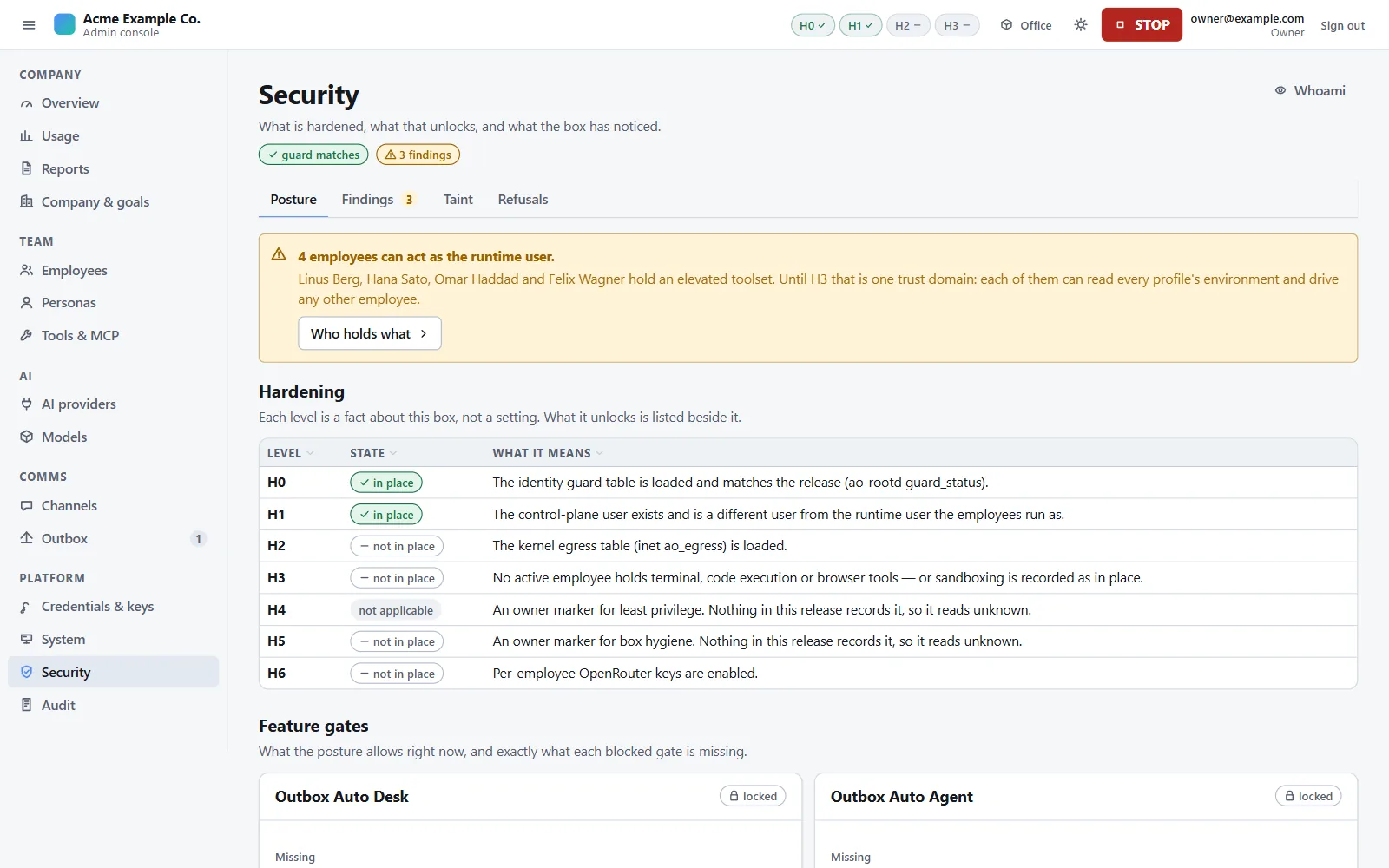
The AI employees run as one operating-system user. An employee holding a terminal or code execution can read every profile's environment, act as any other employee, write the board and rewrite its own usage records. (The browser tool would carry the same risk; it cannot be granted in this release.) Per-employee isolation is not built yet; it is the first item after the first release. Until then these are labels, not boundaries:
| What | What holds instead |
|---|---|
| Which employee a model call came from | Totals are exact; per-employee attribution is marked advisory |
| Per-employee spend caps | Company, class and model budgets at the gateway |
| The purpose an employee claims for a model call | Each token compiles against one data-policy floor for all its purposes |
| Credentials granted into an employee's environment | Labelled advisory; credentials that can send are never written there |
| Automatic sending of employee-drafted items | Closed while any active employee holds one of those tools |
The starter packs grant none of these tools, and granting one is an owner action with the PIN. What cannot be prevented is watched for: a nightly scan of every profile's memories and skills, and a nightly cross-check of the gateway's metering against the runtime's own records.
Known gaps
Every gap the whitepaper lists for version 0.1.0, in plain words. Each release gets its own edition of the paper, with its gaps dated.
| Gap | Effect | What holds meanwhile | Status |
|---|---|---|---|
| Terminals and code execution are not sandboxed per employee | See the biggest gap | The controls listed there | After the first release |
| Employees can reach public internet addresses, with or without H2 | An employee can carry data it can read to a public host through its web tools, or a terminal it holds | Outward-reaching built-in tools are blocked in a tainted session; elevated tools need the PIN and are absent from the starter packs; H2 keeps employees off the LAN, the tailnet and cloud metadata | Part of sandboxing |
| A task card can name its own model service, and some services the agent runtime ships need no key | A worker's whole session can run on a model service you never chose, outside the data policy, the budgets, the metering and kill-switch levels L1 and L2 | A health check every 60 seconds blocks such unfinished cards and re-blocks them; a tainted session cannot create cards; the nightly cross-check flags the use; L3 stops it. All after the fact | Release checklist for v0.1.0 |
| Tools of attached tool servers are not blocked in a tainted session | A tainted session can pass what it read to an attached server | Attaching a server needs the PIN; the vetted catalogue records each server's egress class; a sending server attaches limited to its read-only tools | No fix scheduled yet |
| The taint plugin cannot read the published list of tainted cards | A worker on a card derived from inbound text is not blocked unless its own session read inbound text | The employee's six-hour taint window still caps its outbox items and narrows its model route | Open issue |
| With no search service configured, web search uses the free public tiers of services the runtime ships with | Search queries, which can carry what an employee read, go to services you did not choose | Configure a search service, or remove web and search from the employees' tools | Release checklist for v0.1.0 |
| Web pages and workspace files do not taint a session | A hostile web page can steer an employee without capping its outbox items | Every class starts at approve; the lint and the review check everything that leaves; a nightly scan looks for injection patterns | Open issue |
| Three tools call a vendor directly: text-to-speech, image generation and X search | They are unavailable in this release | A toolset audit of the pinned runtime, repeated whenever the pin moves | Until the gateway has a route for them |
| The agent runtime downloads a public model-metadata catalogue when it has no fresh copy | That site sees the machine's public address, about every four hours per employee profile | No company data is sent | Release checklist for v0.1.0 |
| What an apply writes into the agent runtime has not been checked on a machine with a real model | The runtime-side controls (the taint veto, the hardening settings) are shown by tests, not yet by a recorded run | The gateway, the kernel tables, the outbox and the audit do not depend on them | Release checklist for v0.1.0 |
| The agent socket checks the bearer token alone | A process that can read an employee's token could call the agent plane | The socket is limited to the runtime group | Open issue |
| H2 allows DNS on loopback only | A machine whose resolver is on the LAN or tailnet loses employee DNS under H2 | The local stub resolver works | Open issue |
| A suspected gateway bypass does not close the automatic-send gates | Automatic sending can continue after a bypass alert | The audit row, the red health check and the Security page's cross-check table | Open issue |
| A content refusal delivered as a normal answer gets one fallback attempt | The same prompt can reach one fallback model | Refusals delivered as an error are final | Open issue |
| No restore command, and backups stay on the machine's disk | A dead disk loses the backups with the data | The monthly restore test; you copy backups off the machine | Open issue |
| The employees' half of each backup is not pruned | Disk use grows over time | The control plane's own backups follow the retention rule | Open issue |
| No command compares the audit chain with the root-owned anchor log | A process running as the control plane could rewrite recent audit rows without the verify command noticing | The root-owned anchor log and the journal mirror, compared by hand | Open issue |
| Every model server on the machine reads as attested, not verified | The starter packs' strictest floors admit no local model server until the owner loosens them, so a local-models-only install has to loosen them (with the PIN) | A provider endpoint the machine can verify as zero-retention satisfies those floors | Open issue |
| Releasing L3 from the root command line leaves the kernel drop in place | The drop stays until released from the console | Release L3 from the console | Documented |
| The kill-switch drill has no console control | An API call is needed before any class can be automatic | The drill's API route | Console backlog |
| Release archives are not signed; no rollback command | See updates | Pinned dependency hashes, the release manifest, a backup before each upgrade | Signed updates planned |
| No command rotates the vault key or the gateway's key pair | A suspected key compromise means re-entering credentials on a rebuilt machine | Keys are root-only and never leave the machine | Not scheduled |
| local mode serves plain HTTP on loopback | Transport security depends on the SSH tunnel or your HTTPS proxy | Loopback-only listeners, Secure cookies | By design |
| tailscale mode has not been run end to end | Its identity path is covered by tests, not yet by a recorded install | local mode is the verified path | Release checklist |
| Two hardening items always read unknown on the Security page | The page cannot show them as met | The gates count unknown as missing | Part of sandboxing |
| No single sign-on, SCIM or directory integration | Logins are added and removed on the machine | Roles only from the root-owned file | Not scheduled |
No dedicated security address or security.txt, no independent penetration test, no bug bounty | Reports go through the general contact | Reporting a problem | Not scheduled |
Who is responsible for what
| Area | The product | You |
|---|---|---|
| Host | Refuses an unsupported platform; checks the install with ao doctor | Provide a dedicated machine, patch the operating system, secure physical access |
| Disk encryption | Encrypts vault values, authenticator keys and inbound text | Encrypt the disk |
| Access | Two origins, two factors, roles from a root-owned file | Keep tailnet or SSH access tight; remove people who leave |
| Owner actions | The PIN on every owner action | Set the PIN on the machine; keep it and the recovery codes private |
| Model data | Enforces the data policy, with provenance, on every call | Choose providers, sign their terms, attest only what is true |
| Outbound messages | Autonomy levels, review, ceilings, content-hash approval | Keep channels at approve until you have read a month of drafts |
| Egress | The kernel tables; H2 when turned on | Turn H2 on once integrations are settled |
| Backups | Nightly backups and monthly restore tests | Copy backups off the machine; keep the vault key safe separately |
| Updates | Pinned, hash-checked installs; an immutable release tree | Take a backup, run the upgrade, run ao doctor |
| Monitoring | Health checks, findings, the audit and its anchors | Read the owner decisions and the Security page weekly; verify the audit chain |
Reporting a security problem
Please do not report a security problem in public. Until a dedicated security address exists, use the contact address and start the subject with "Security". Include what you did and what happened, the component, the version, and your view of the impact.
Never include a real secret. Redact API keys, tokens, passphrases, PINs, setup tokens, session cookies and personal data. There is no bug bounty. We credit reporters unless they ask us not to.